

Help for students
Completion requirements
Submit an Assignment
You may be asked to attach files or enter text directly into a text box.
Note: If your instructor is asking you to upload a file, they should inform you what file format you should submit (eg., .pdf, .doc, .pptx or .docx).
Note: If your instructor is asking you to upload a file, they should inform you what file format you should submit (eg., .pdf, .doc, .pptx or .docx).
- Click the link to the assignment. The Assignment page will open, showing instructions and your submission status (date submitted, grade, etc.) for this assignment.
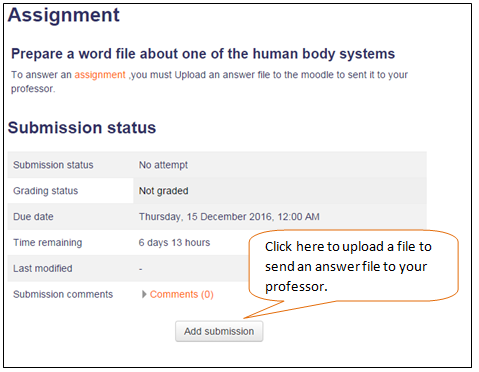
- Click Add submission. The Assignment submission page will open.
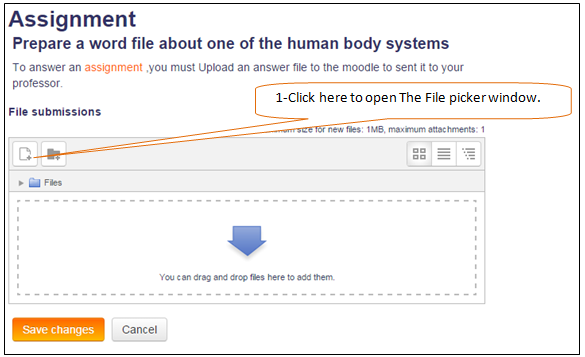
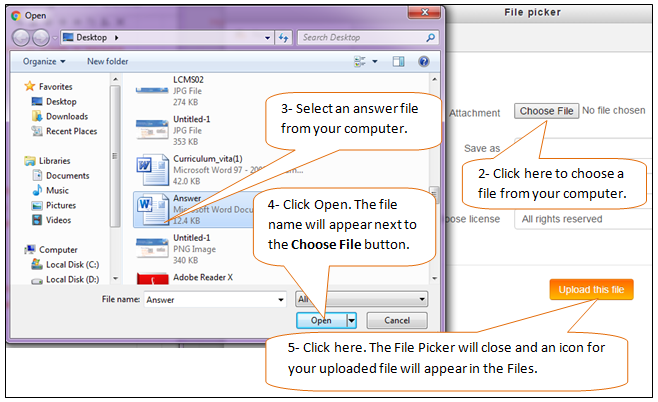
- Once your file(s) appear in the Files submission area.
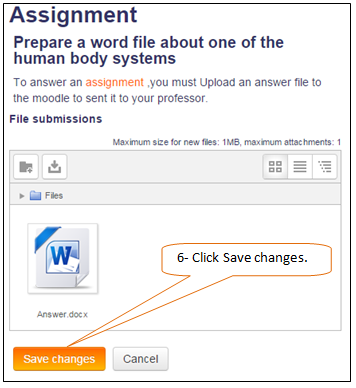
- If your professor allows you to revise your submission you'll see an Edit submission button on the Assignment page. Click Edit submission to add or replace files, or edit a text submission. When you are finished making changes, click Save changes.